I Tested Gmail’s AI Privacy Settings on My Own Accounts. What I Found Should Worry You.
Published: December 30, 2025
I’ve spent fifteen years building products that handle user data. I know what good privacy practices look like.

I’ve spent fifteen years building products that handle user data. I know what good privacy practices look like.
And what I discovered digging into Gmail’s AI training controversy made me genuinely angry — not because Google is doing something unprecedented, but because of how deliberately confusing they’ve made it.
Let me be direct: this isn’t another “Google is evil” hot take. The reality is messier, more technical, and far more troubling than the viral headlines suggest.
After testing multiple Gmail accounts and reading through hundreds of user reports, I found something worse than a simple privacy violation.
I found a masterclass in consent manipulation.
The Story Everyone Got Wrong
In November 2025, a panic swept through tech circles: Gmail was supposedly training AI on everyone’s private emails without permission.

The story exploded — 6.7 million views on a single tweet, a class-action lawsuit, mass exodus to privacy-focused alternatives.
Then came the corrections. “Misleading,” Google said. “We haven’t changed anyone’s settings.”
Here’s what I’ve learned after years of watching companies deploy AI systems: when a tech giant says something is “misleading,” they’re usually telling a very narrow technical truth while obscuring a much larger, uncomfortable reality.
The truth about Gmail and AI isn’t a simple yes-or-no answer.
It’s three separate systems, two hidden settings menus, and one fundamental question about what “consent” actually means when basic features are held hostage.
What Gmail Actually Does (And Why It Matters)
There are three distinct AI systems operating in your Gmail account right now:
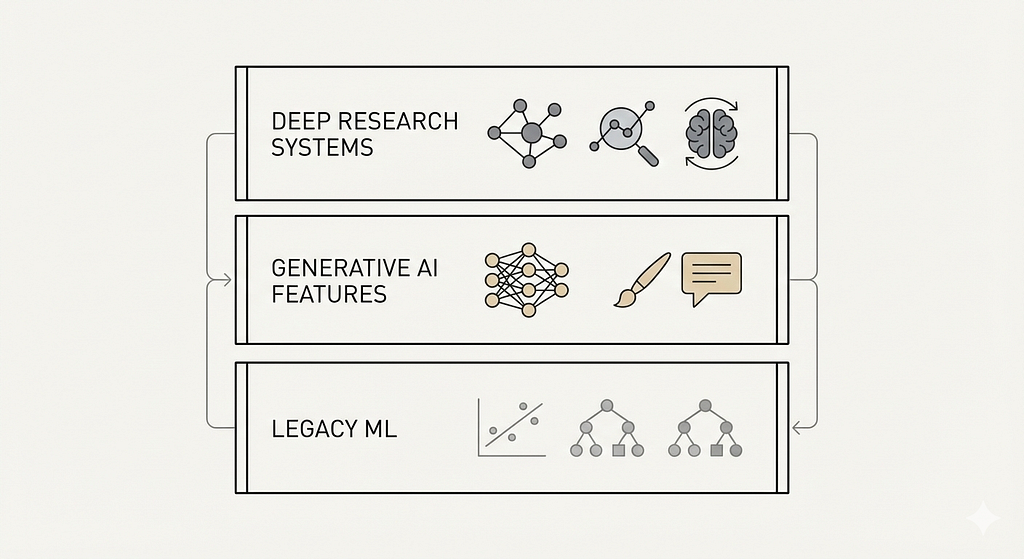
The old guard: Traditional machine learning that powers spam filters, email categorization, and basic autocomplete. This has been scanning your emails for years. Most people accepted this trade-off because it made email usable.
The new AI: Gemini-powered features rolled out in 2023 that generate email summaries, offer advanced composition help, and create contextual suggestions across your entire Google ecosystem. This is where things get interesting.
The research mode: Gemini Deep Research, announced in November 2025, which can dive deep into your entire Google history — emails, Drive documents, calendar events — but supposedly requires explicit opt-in.
The controversy isn’t really about whether Google scans your email. They’ve always done that.
The issue is what they’re doing with it now, and how they’re obtaining consent.
I Checked My Own Accounts. You Should Check Yours.
Here’s where my practitioner skepticism kicked in.
When Google claims users are “opted out by default,” I don’t take their word for it. I test.
I have four Gmail accounts: my primary account I use daily, a professional account, and two older accounts I haven’t touched in years. All created at different times, under different Terms of Service.
I logged into each one and navigated to Settings > Smart features and personalization.
Three out of four had AI features enabled.
The two accounts I hadn’t accessed since before 2023? Both had the new Gemini features turned on. These weren’t accounts where I’d clicked through any new consent dialogs or accepted updated terms recently.
Now, I’m a single data point. But forums are full of similar reports.
Users checking accounts they’d abandoned years ago, finding AI access mysteriously enabled. The pattern is clear enough to raise serious questions about Google’s “nothing changed” narrative.
The Two-Location Problem Is Deliberate
If you want to actually opt out of Gmail’s AI features, you need to disable settings in two separate locations.
Not one. Two.
First, you go to Settings > Smart features and personalization, and uncheck “Turn on smart features in Gmail, Chat, and Meet.”
But you’re not done.
You then need to find — buried in the same section — a link to “Manage Workspace smart feature settings” and disable another set of toggles for “Smart features in Google Workspace” and “Smart features in other Google products.”
I’ve designed user settings interfaces. I know what deliberate friction looks like.
This isn’t an accident of poor UX. This is intentional architecture designed to maximize the number of users who think they’ve opted out but actually haven’t.

It’s consent theater.
What makes this particularly insidious: some users report that after disabling these settings, closing the app, and reopening it, the toggles mysteriously flip back to enabled. I haven’t personally verified this, but the volume of reports is concerning.
The Enshittification Hostage Situation
Here’s what really bothers me as someone who’s built user-facing products: if you opt out of AI features, Gmail disables spell check.
Read that again. Spell check.
A basic feature that’s existed in email clients since the 1990s. A feature that has nothing to do with generative AI or large language models.
Google has architected their system so that refusing AI data collection means losing functionality that should be completely independent. This isn’t a technical limitation — it’s a business decision.
This is textbook enshittification: making core features conditional on agreeing to data extraction.
You must choose between privacy and basic usability.
I’ve watched this pattern repeat across the industry. First, companies offer great free services. Then they make them dependent on data collection. Then they make opting out so painful that most users give up.
The question isn’t whether Google has the right to scan your email to provide features.
The question is whether they should be allowed to bundle unrelated features together to coerce consent.
What “Training AI” Actually Means
Let’s get technical for a moment, because the distinction between “training AI” and “powering features” matters less than companies want you to think.
When Google says they’re not training Gemini on your Gmail content, they mean they’re not using your emails as raw training data in the foundational model training process.
But here’s what they are doing:
Your email content is being processed by AI systems to generate summaries, suggestions, and contextual information. These interactions are stored for up to 18 months, with some anonymized data retained for three years for “quality reviews.”
Your data shapes how the AI responds to you, refines personalization algorithms, and contributes to understanding how humans communicate.
If you think that’s meaningfully different from “training,” I have concerns about your definition.
In my experience building ML systems, the line between “inference” and “training” is philosophical more than technical.
Data that improves system performance is training data, even if it happens after the initial model training phase.
The Data You’re Actually Sharing

Let me be specific about what Gmail can access when these features are enabled:
Every email you’ve ever sent or received. Every attachment. Every draft. Google Chat messages. Meet recordings. Calendar events with sensitive details. Drive documents.
Think about what’s actually in your inbox right now.
Medical test results with diagnosis codes. Tax documents with your Social Security number. Legal communications that should be protected by attorney-client privilege.
Bank statements. Investment portfolios. Confidential work documents covered by NDAs.
The average person sends hundreds of emails containing information they would never want processed by a generative AI system that might hallucinate details, make connections that shouldn’t exist, or retain information in ways we don’t fully understand.
I handle data architecture for a living.
The idea of all that historical data being retroactively included in an AI system, without granular consent for specific data types, is a compliance nightmare.
Why Europe Got Better Treatment
There’s a telling detail in this story: European users have these features disabled by default.
GDPR isn’t perfect, but it enforces a principle American companies hate: affirmative consent. You must actively choose to enable data collection, not find hidden menus to disable it.
Google knows how to build privacy-respecting defaults.
They just choose not to apply them in markets where they can get away with it.
I’ve worked on products launching in multiple jurisdictions. We always built the more privacy-preserving version because we had to for Europe.
Then we debated internally whether to “degrade” the experience for US users to enable more data collection.
Usually, the business side won.
The Real Crisis: Running Out of Training Data
Here’s what’s not being discussed enough: AI companies are desperate for high-quality training data.
Large language models have largely exhausted the publicly available internet. Books, articles, social media posts — they’ve consumed it all.
The next frontier is private data: your emails, your documents, your conversations.
This explains why:
- Google is pushing so hard on Gmail AI integration
- OpenAI got caught training on copyrighted books
- Companies are scraping social media more aggressively than ever
- Terms of Service keep quietly changing to allow AI training
The economics are simple: whoever has the most comprehensive, highest-quality training data wins the AI race.
And your private communications are the richest untapped resource available.
I’ve watched this pattern before with advertising. First, companies used data to serve you ads. Then they used data to predict your behavior.
Now they’re using data to train AI systems that will power everything.
Each time, they claimed it was necessary to provide features you wanted. Each time, they made opting out progressively harder.
What This Means For You
If you use Gmail — and 1.8 billion people do — you need to make an informed choice about what you’re comfortable with.
I’m not telling you to delete your Gmail account. That’s not realistic for most people.
But I am telling you to understand what’s actually happening and decide consciously rather than by default.
The broader issue is that this pattern will repeat.
Every service you use is facing the same pressure to feed AI systems. Your messaging apps, your photo storage, your note-taking tools — they’re all looking at ways to monetize your private data through AI features.
The question isn’t whether this specific Gmail implementation crosses your line.
The question is where you draw that line, and how you’ll maintain it as companies push further.
My Recommendation
I’m keeping my Gmail account, but I’ve disabled the AI features.
Yes, I lost spell check. Yes, it’s annoying. But I’ve decided that the privacy trade-off isn’t worth it for features I can live without.
If you want to do the same, you need to manually check both settings locations. Search for step-by-step instructions if you need them — this article is already too long.
More importantly: check back periodically.
With multiple reports of settings mysteriously re-enabling, I don’t trust that a one-time change will stick.
For sensitive communications, I’m moving to end-to-end encrypted services. It’s not convenient, but neither is wondering whether my private medical information is sitting in an AI training dataset somewhere.
The Lawsuit Might Actually Matter
The class-action lawsuit filed against Google alleges violation of California’s Invasion of Privacy Act.
The legal theory is that Google made material changes to how user data is processed without explicit, informed consent.
I’m not a lawyer, but I’ve been through enough privacy compliance reviews to know this case has teeth.
The question isn’t whether Google technically violated their Terms of Service — they probably didn’t.
The question is whether the Terms of Service themselves constitute valid consent when:
- Changes are buried in updates no one reads
- Opt-out processes are deliberately obscured
- Features are retroactively applied to historical data
- Basic functionality is held hostage to coerce agreement
This lawsuit could establish precedent about what counts as meaningful consent in the age of AI.
That matters for every service you use.

The Pattern That Should Worry You
I started this article saying I’m not here to bash Google specifically.
Here’s why: every major tech company is trying versions of this same playbook.
Microsoft is integrating Copilot deeper into Office. Apple is adding AI features to iOS that process your on-device data. Meta is training AI on your social media content. Amazon’s Alexa has always been listening.
The Gmail controversy is just the most visible example of a fundamental shift in how tech companies view user data: not as something to protect, but as a resource to extract.
What makes this moment different from previous privacy controversies is the scale and permanence.
Once your data trains an AI model, it can’t be un-trained.
The patterns and insights derived from your private communications become permanent features of systems that will exist for decades.
We’re in a phase transition for digital privacy.
The old model — where you traded data for free services — is evolving into something more extractive. And most users won’t notice until it’s too late.
I’ve built systems that handled millions of users’ data. I know how easy it is to rationalize each incremental step.
“It’s just to improve recommendations.” “It’s just to power this one feature.” “Everyone else is doing it.”
But incremental steps lead to places you never intended to go.
Gmail’s AI features might be defensible individually.
The real problem is the direction: toward more data extraction, less transparency, more coerced consent, and less user control.
That trajectory should concern you whether you use Gmail or not.
What are your experiences with Gmail’s AI settings? Have you found them enabled by default, or have settings re-enabled themselves? I’d genuinely like to know if my observations match yours — leave a comment.

